Find out why screen sharing fails on your Wayland desktop
You click Share screen and get a black frame, no picker or the wrong windows. Screenshare Doctor starts from the app and what you see, checks every layer from the portal to PipeWire without starting anything, and names the one at fault.
uv tool install screenshare-doctor
screenshare-doctor troubleshoot screenshare --app firefox --symptom black-screenFollow the signal
From your app to your viewers, a screen share passes through six layers. The symptom tells Screenshare Doctor where to look first. Pick what you see and your desktop.
- Your appasks to share
- SessionWayland, D-Bus
- Portalxdg-desktop-portal
- Backend
- Compositor
- PipeWirecarries the frames
- WirePlumberlinks the stream
Checked, most likely cause first
The layer at fault, with the evidence
A real case on GNOME: Discord shows no picker. Every portal check passes but one: a
portals.conf in the user’s config folder switches ScreenCast off, and the running portal
keeps its old configuration until it restarts. The report names the file, the line that decides it and
the command that fixes it.
Each check says whether a backend is predicted by your portals.conf files or
observed answering on D-Bus, so you can see a configuration that hasn’t taken effect yet.
screenshare-doctor doctor                    # every check, session to PipeWire
screenshare-doctor routes explain ScreenCast # which backend, and which line decides it
screenshare-doctor check desktop             # your setup against the desktop’s defaults
screenshare-doctor report --output report.md # redacted, ready for a bug tracker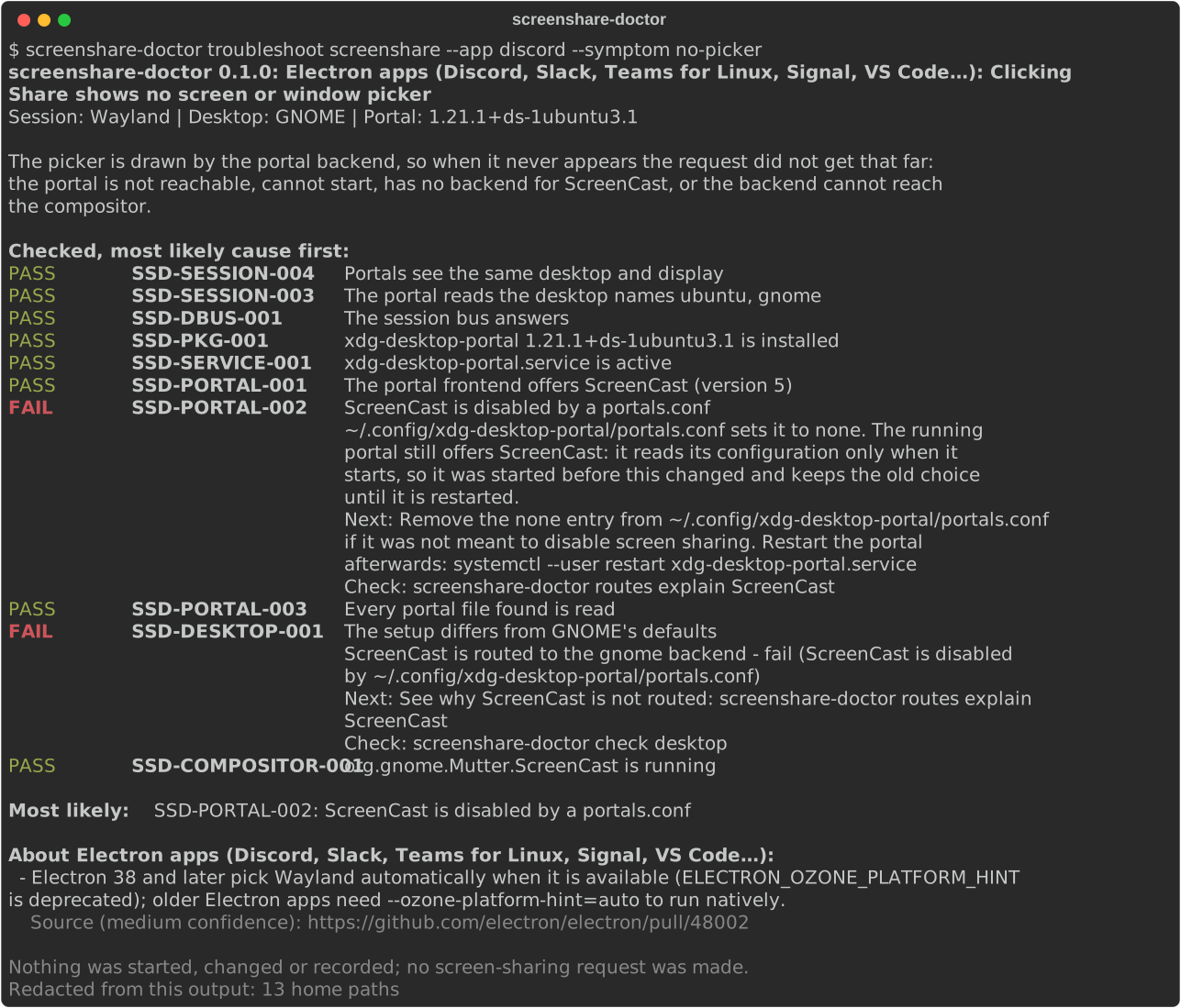
Passive by default
- Nothing opens. No screen-sharing request, no picker, no recording.
- Nothing starts. A portal that isn’t running is reported as such; D-Bus is asked with auto-start off, and PipeWire only when it already runs.
- Nothing changes. No service is restarted, no file is edited, and
sudois never needed. - Unknown stays unknown. A check that could not run is never shown as passing.
- Safe to paste. User names, home paths and window titles are redacted from every report, JSON included. No network access, no telemetry.
In the GNOME top bar
The GNOME Shell extension shows the result of the same checks whenever you open its menu, and copies a redacted report when you ask. It runs nothing while the menu is closed. It needs the command-line tool and supports GNOME 46 to 50.
Tested on real sessions
A desktop is listed as supported only after a run on a real session; the defaults for each come from the desktops’ own source files, with links.
| Desktop | Where | Screen-cast backend | Result |
|---|---|---|---|
| GNOME 50.1 | Ubuntu 26.04, laptop | xdg-desktop-portal-gnome | every check as documented |
| KDE Plasma 6.8.2 | Fedora 45, VM | xdg-desktop-portal-kde | every check as documented |
| Hyprland 0.57.1 | Arch Linux, VM | xdg-desktop-portal-hyprland | every check as documented |
Using another setup? A test report moves it up the support matrix.