Why does PyTorch use the GPU in one environment and not another?
nvidia-smi lists your GPU, yet torch.cuda.is_available() is
True in one environment and False in the next. GPU Stack Inspector inspects them
side by side from one command, finds the layer where they part ways and tells you what to change.
uv tool install gpu-stack-inspector
Or pipx install gpu-stack-inspector.
Needs Python 3.11 or newer; the environments it inspects can be Python 3.8 or newer.
Figure 1 One machine, two stacks
Both environments share the GPU, the driver and your shell’s variables; each brings its own Python, torch build and CUDA libraries. Pick a case to see where the stacks part ways. The first case is real output from the test laptop; the others are what the same checks report for other inputs.
Python
PyTorch build
CUDA libraries
Your shell
Driver
GPU
A
B
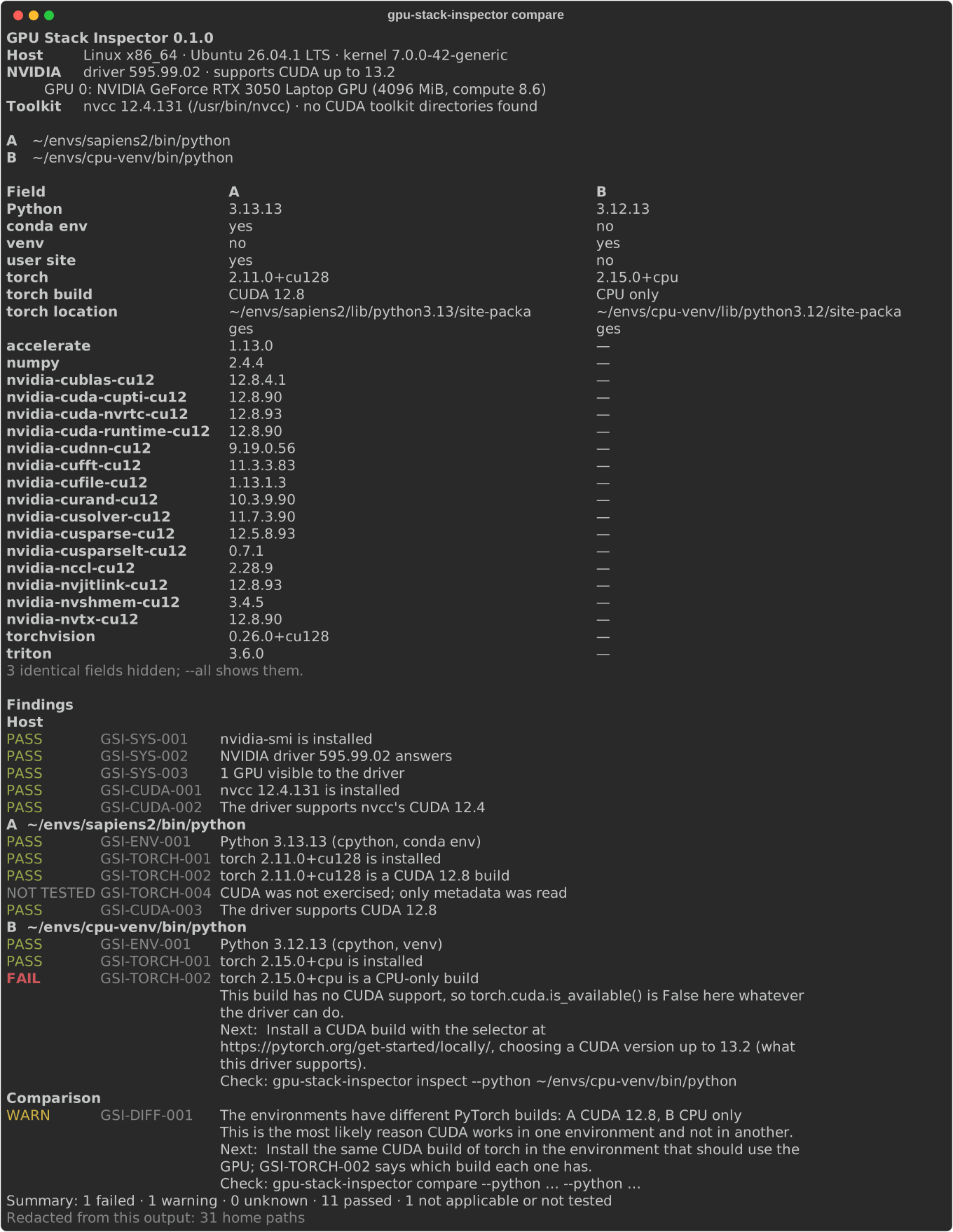
Figure 2 Typical output
Real output from a laptop with an RTX 3050: a conda environment with a CUDA 12.8 build of torch, against a uv venv where a CPU-only wheel came in. The table lists every field that differs; the findings say which difference matters.
Each finding has a stable code. gpu-stack-inspector rules explain GSI-TORCH-002 explains one in
full, and the troubleshooting guide
lists the common ones.
Commands
gpu-stack-inspector compare --python A --python B
gpu-stack-inspector inspect --python B
gpu-stack-inspector probe --runtime --python B
gpu-stack-inspector report --python B --output gpu-report.md
gpu-stack-inspector rules list
Without --python it inspects the python your shell runs.
--format json gives the same data to scripts.
Absolute maximum ratings
What the inspector does to your machine, at most. These limits hold for every command.
| Parameter | Limit | Notes |
|---|---|---|
| Packages installed, upgraded or removed | 0 | Read-only; it never runs pip or conda. |
| Privilege | your user | Never sudo. |
| Network requests | 0 | No telemetry. Compatibility data ships with the tool, dated and with its source. |
| Imports of torch | 0 | Metadata is read from disk. Only probe --runtime imports torch, in the target interpreter, and runs one 16-element operation on the GPU. |
| Files written | 1 | The report you name with --output, and nothing else. |
| Time per interpreter | 8 s | Then the probe is stopped and reported as a timeout; 60 s for probe --runtime. |
| Checks shown as passing without running | 0 | A check that could not run is unknown or not tested, never green. |
Home paths, user and host names, secrets and tokens are redacted before anything is printed or written, JSON included, and each report says what it removed. Details in privacy.
Characteristics
Every check, by the layer it looks at. A check that depends on another one is not repeated when that one fails: you see the cause, not its echoes.
| Layer | Code | Check |
|---|---|---|
| Machine | GSI-SYS-001 | NVIDIA driver tools are installed |
GSI-SYS-002 | The NVIDIA driver answers | |
GSI-SYS-003 | The driver sees a GPU | |
GSI-ENV-003 | CUDA_VISIBLE_DEVICES does not hide the GPUs | |
| Interpreter | GSI-ENV-001 | The interpreter can be inspected |
GSI-ENV-002 | The interpreter is the one the shell runs | |
GSI-TORCH-001 | PyTorch is installed | |
GSI-TORCH-002 | The PyTorch build supports CUDA | |
| Compatibility | GSI-CUDA-001 | nvcc is installed |
GSI-CUDA-002 | The driver supports nvcc’s CUDA version | |
GSI-CUDA-003 | The driver supports the CUDA version PyTorch was built for | |
| Comparison | GSI-DIFF-001 | The compared environments have the same PyTorch build |
| Runtime, opt-in | GSI-TORCH-003 | CUDA works at runtime |
GSI-TORCH-004 | CUDA was exercised at runtime |
Test conditions
Validated on an Ubuntu 26.04 laptop with an RTX 3050 and driver 595.99.02, against five real environments: conda and uv, Python 3.8 to 3.13, CUDA 11.3 to 13.0 builds and a CPU-only build. CI runs the test suite on Linux and Windows, and the probe inside Python 3.8 to 3.10 and PyPy.
Windows and WSL with a GPU, containers and macOS are not validated yet. A test report from your machine moves them up the support matrix.
Related tools
To check a single environment, cuda-doctor, env-doctor and cudadoc may already be enough. GPU Stack Inspector is for the case where one environment works and another, on the same machine, does not.